As you'll have seen from
Blogger Buzz,
Blogger have rolled out some whizzy new features. They're moving existing Blogger users over gradually so you'll see a link in your Dashboard when you're eligible - sadly I'm not yet, wail. But you can still sign up to try it out by
creating a new account and blog, and they'll merge old and new accounts eventually.
Some helpful resources about the beta:
- visual tour of the new features
- one-page overview of what's new
- help pages available on the new features
- known issues - what's still on the to-do list, known bugs, etc - but some features supposedly there still aren't e.g. keeping backups of your template - I haven't got a "Customize Design" tab myself, anyway.
Here's a summary of the new features, and I'll cover some of them in more detail later:
Some initial views and thoughts now. I'll try not to duplicate what's in the
tour but there may be some.
New look blog
Here's what the new-style blog looks like (
visit an example direct):

You'll see the feed link ("Subscribe to: Posts") at the bottom by default, so you no longer have to fiddle with your template to add in a link for readers to subscribe to your site feed. Notice also the improved archive display - so visitors can choose to see the year's archive, or just a month's, and the automatic inclusion of how many posts there have been in a particular month or year.
Also notice the top right of the navbar has an easy Sign Out link and New Post and Customise links too (if you're signed in). The Customise link takes you to the Template tab's Page Elements page, covered below. If you're not signed in, there's a Sign in link and also a Create Blogs link there instead:

Categories
You'll also have noticed under each of the top two posts a "Labels:" line. Yep, that's categories! To file a new post into a particular category, when you create the post there's a new line under the post editor box, "Labels for this post", where you can just type in the categories/tags you want:

Multiple word categories are fine, just separate them with a comma - in my case I just typed in "motor bikes, scooters" (without the quotation marks) and they appeared at the end of the post. Though uppercase, somehow - there must be a way to configure that if you prefer not to have them in uppercase.
When you click on a category link, it points to posts labelled with that category just within your own blog, i.e. it brings up a page that just contains the posts in your blog which have that label e.g. "Scooters" in this example:

Blogger must have instituted a more sophisticated kind of searching within a blog, i.e. searching by label, because the URL is of the form e.g.
http://improbulusbloggerbetatest.blogspot.com/search?label=motor+bikes. This means it will be easy to search in any Blogger blog of your choice for any label of your choice. It'll be interesting to see if combo searching is introduced at some point, i.e. searching for posts categorised uner this label OR that label within a blog, or posts which have been categorised with BOTH A and B.
A clever feature is label autocomplete - as you type in a label, if it recognises it as one you've already typed in the past, it suggests it for you and you can just hit Enter to use it:

Once you've started using labels, it even saves them and "Show all" can show you a list of what you've used before:

So it looks like the
Magical Sheep tagger for Blogger may become redundant soon - though not yet, perhaps, as that still provides a few extra features. (
[Updated 24 August:] My pardner
Kirk has tweaked the Greasemonkey script (see the
original post for download links) to make it work for the new beta blogs;
here's how to tweak it yourself to make the script work with Blogger Beta.)
[Added 24 August:] The new labels
will get properly picked up on
Technorati's tag pages and correctly converted to category elements in Blogger feeds. See
this post for more on labels, categories and tags.
Permissions and private blogs
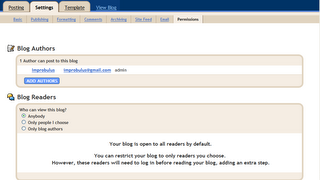
You can now have
private or restricted-view blogs; the way in which you can restrict readers is self-explanatory:
Easier template customisation
This is a good one. Here's what the Template tab now looks like (a new Page Elements page):

Blog Posts - that Edit link at the bottom right of the Blog Posts box lets you configure various things easily by checkboxes, rather than editing your template code by hand:

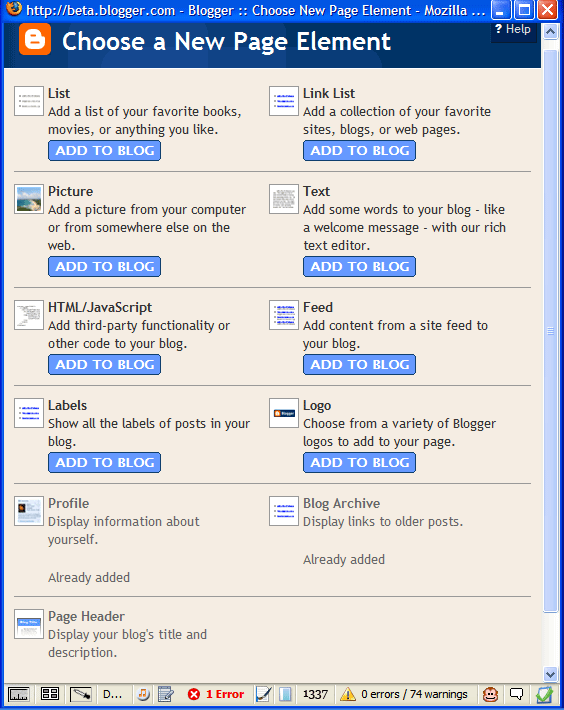
Add a Page Element - this link, which you'll notice is in the sidebar as well as footer, allows you to choose various options to add to your sidebar or footer just by ticking a box, like links, link lists, pictures/photos, just plain text, HTML/Javascript, labels (as in, to enable display all your labels/categories in your sidebar), a choice of Blogger logos, profile information and your blog archive.

In the template tab there's a new Fonts and Colors sub-tab, and this is what you get with it (I've picked a new colour so you can see the instant change). As you can see, you can pick colours for different elements of your template blog page easily by just clicking:

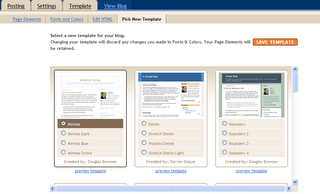
Edit HTML doesn't work yet. But Pick New Template offers more templates than before, with easier colour choice too (see also
these illustrations):
Archive features are easily customisable:

Feeds
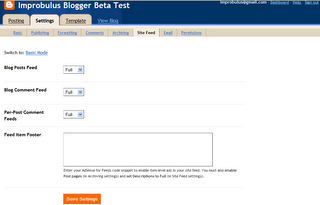
Under the Settings, Site Feeds tab, there is now an Advanced Mode option where as you can see you can change the settings for your blog posts feeds, blog comment feed and per-post comment feeds as well as feed item footer for
Adsense (there are
instructions on the site feed settings too):
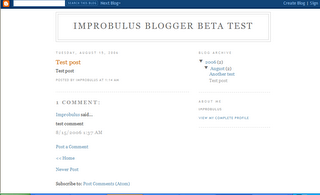
A "Subscribe to: Post Comments" link to subscribe to a comment feed for an individual post appears at the end of the post, automatically:
I wonder if even on "old" Blogger blogs it may be possible to
add comment feeds by template tweaking - I haven't had a chance to try yet, but I plan to!
Other points
There's a new dashboard with easier access to main settings but I won't include a screenshot here, see e.g.
the tour.
All good stuff. More when I've had a chance to play with it further and new features are made available. Good on yer,
Blogger and thank you - categories and comment feeds at last!
Added 17 August:
Philipp Lenssen has made a helpful
video showing the Blogger beta features in action which is worth a look. And Blogger's official blog
Blogger Buzz has an
update about Blogger Beta.
Tags:
Blogger, Blogger.com, blog, blogging, blogs, consumer, guide, guides, review, reviews, features, whatsnew, categories, tags, comments, comment feeds, comment feed, labels, templates, customisation, customization, Improbulus, Consuming Experience, A Consuming Experience